It Is Slow On A Phone
Pages that take several seconds to appear on mobile data lose people before they read a word, and a slow site is harder to rank.
A new site for a business that has outgrown its old one. We rebuild it properly and carry across the pages, links and search traffic you already have.
A redesign should fix what is costing you enquiries: a site that is slow on a phone, hard to update, missing pages for the services you sell or hard for Google to read. It should keep everything that already works.
Those things are easy to lose. Old page addresses that Google has indexed, links from other sites, a contact form wired to the right inbox, the email records on your domain. A careless switch-over can break all of them on the same day, and most owners only find out when the phone goes quiet.
So our redesigns start with a list of every page on your current site and how much search traffic each one gets. Pages that bring in visitors keep their main search term and their depth. Every old address points to its closest new page. Then we build.
Looking a few years old is rarely enough reason on its own. These are the problems that cost enquiries.
Pages that take several seconds to appear on mobile data lose people before they read a word, and a slow site is harder to rank.
Small changes need a developer, a login nobody remembers or a platform you cannot export from.
Every service sits on a single page, so there is nothing specific for Google to rank for each job you sell.
Some sites build every page in the browser with JavaScript, so the raw page a crawler downloads is close to empty. Google can render it later. Many AI search crawlers do not.
A form that quietly fails, an old inbox or a phone number that has changed. These problems stay invisible until someone tests them.
New services, a new area or a new name, sitting on a site that still describes the business you ran five years ago.
The build is the visible part. The steps either side of it are what keep your rankings and enquiries intact.
We pull every address on your current site and up to 16 months of Search Console data, so we know which pages bring in visitors before anything changes.
Each old address gets a permanent (301) redirect to its closest new page. Pages that rank keep their main search term in the title and heading, with the same depth of content or more.
New design, a page for each service, quote paths, speed and SEO setup, built on a working preview you can click through and comment on.
We test every old address on the preview, prove the contact form sends with a real test and check your domain records so email keeps working.
Only the website records on your domain change. Your old hosting stays in place for 14 days as a fallback, ranking pages are left alone for four weeks and redirects stay for at least 12 months.
Redesigns that lose traffic often fail on something small: a setting left on from the preview, a redirect that was never added, a form that stopped sending. These checks catch them while they are still cheap to fix.
Three businesses that moved off an older site, and what changed when they did.
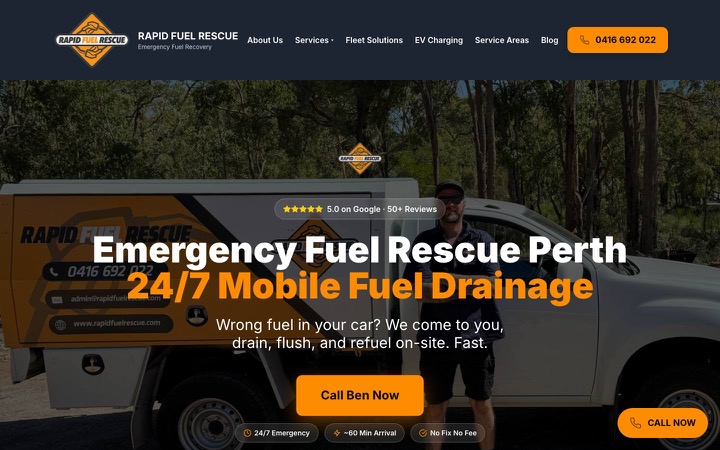
Emergency Mobile Fuel Rescue, Perth, WA
Before
An existing site for a Perth roadside fuel service that needed clear service pages, suburb coverage and a structure Google could read page by page.
After
Migrated, then rebuilt in Astro with service hubs, suburb pages, articles and phone-first calls to action, with monthly SEO alongside.
106
Organic Search Clicks
December 2025
324
Organic Search Clicks
April 2026
6
Google Business Profile Calls
December 2025
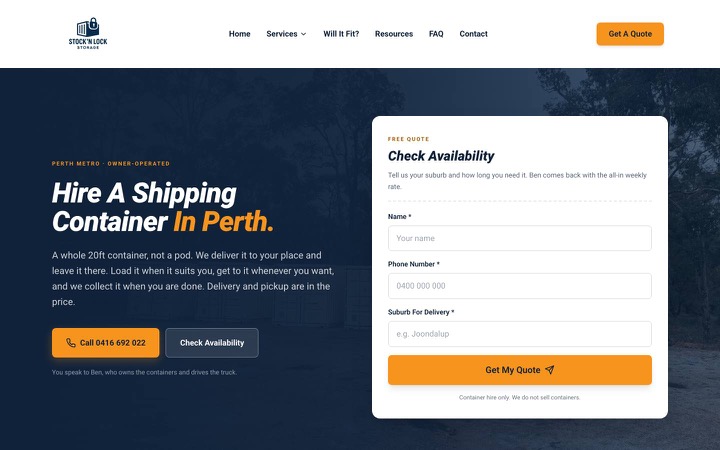
Mobile Storage Hire, Perth, WA
Before
A one-page Vite and React site with no room for the different reasons people hire a storage container.
After
Moved to Astro with dedicated pages for mobile storage, shipping container hire, moving house, renovations and trade-site storage.
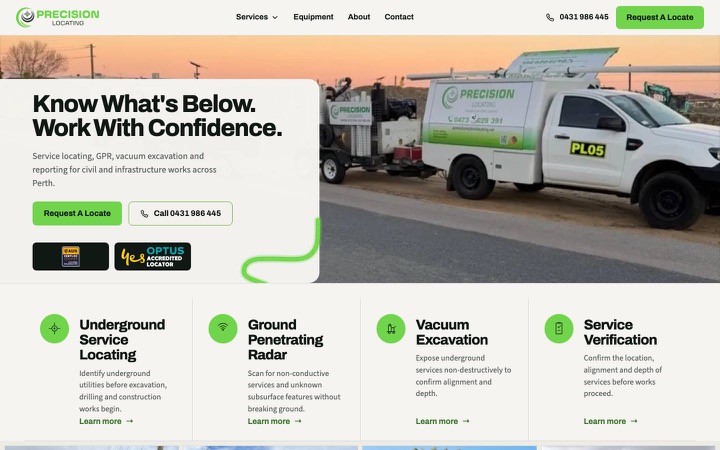
Utility Locating And Civil Services, Perth, WA
Before
A single-page WordPress landing page with no room to explain services, equipment or field capability.
After
A full site with a services hub, dedicated service pages, an equipment page, real field photography and a mobile call bar.
The site is fast, easy to edit and already brings in enquiries, but the photos are old, a few pages are out of date or a new service needs a page. New content on the existing build is cheaper and carries no switch-over risk.
The site is slow, locked to a platform you cannot change, missing pages for the work you sell or hard for search engines to read. Patching those problems one at a time often costs more than rebuilding once and carrying the good parts across.
Not sure which one you need? Send us the address of your current site through the form below and we will tell you straight. If you run a trade business, our tradie websites page covers what a trade site needs to include.
What owners ask before they replace a site that is already live.
A redesign gives you a clean foundation. Monthly SEO builds on it with technical fixes, new content and Google Business Profile work.
Tell us what you need. We'll come back within 1 business day.